User Comments
User Comments were introduced on the MX Player watch page to make viewing more interactive without disrupting playback. The work covered the full comments experience: entry points on show and movie pages, a dedicated comments surface, threaded replies, inline composition, deletion, loading and retry states, avatar handling, empty states and notifications that brought users back into conversations.
Results
- The overall engagement rate on watch pages increased by 10%, measured through the combined metrics of comments, replies and user interactions.
- Users who actively participated in threaded comments showed a 5% higher user retention rate.
- The interaction model gave MX Player a reusable watch-page pattern for comment entry, reply composition, deleted comments, retry states, and comment notifications.
Date
Team members
Cui Shanshan
Organisation

Problem and Strategy
The watch page already carried the highest content intent in the product, but interaction around a video was mostly passive. Users could watch, save, download, or share, but there was no lightweight way to react to a scene, discuss an episode, or see what other viewers were saying.
The design goal was to add conversation without turning the watch page into a social feed. Comments needed to sit naturally inside the existing content hierarchy, work for shows and movies, and stay usable on small Android screens where the video, metadata, actions, seasons, episodes and recommendations were already competing for space.
The feature was therefore treated as a watch-page layer rather than a standalone community product: visible enough to invite participation, compact enough to preserve browsing, and deep enough to support longer conversations when users chose to open the full comments view.
Entry Points and Reading
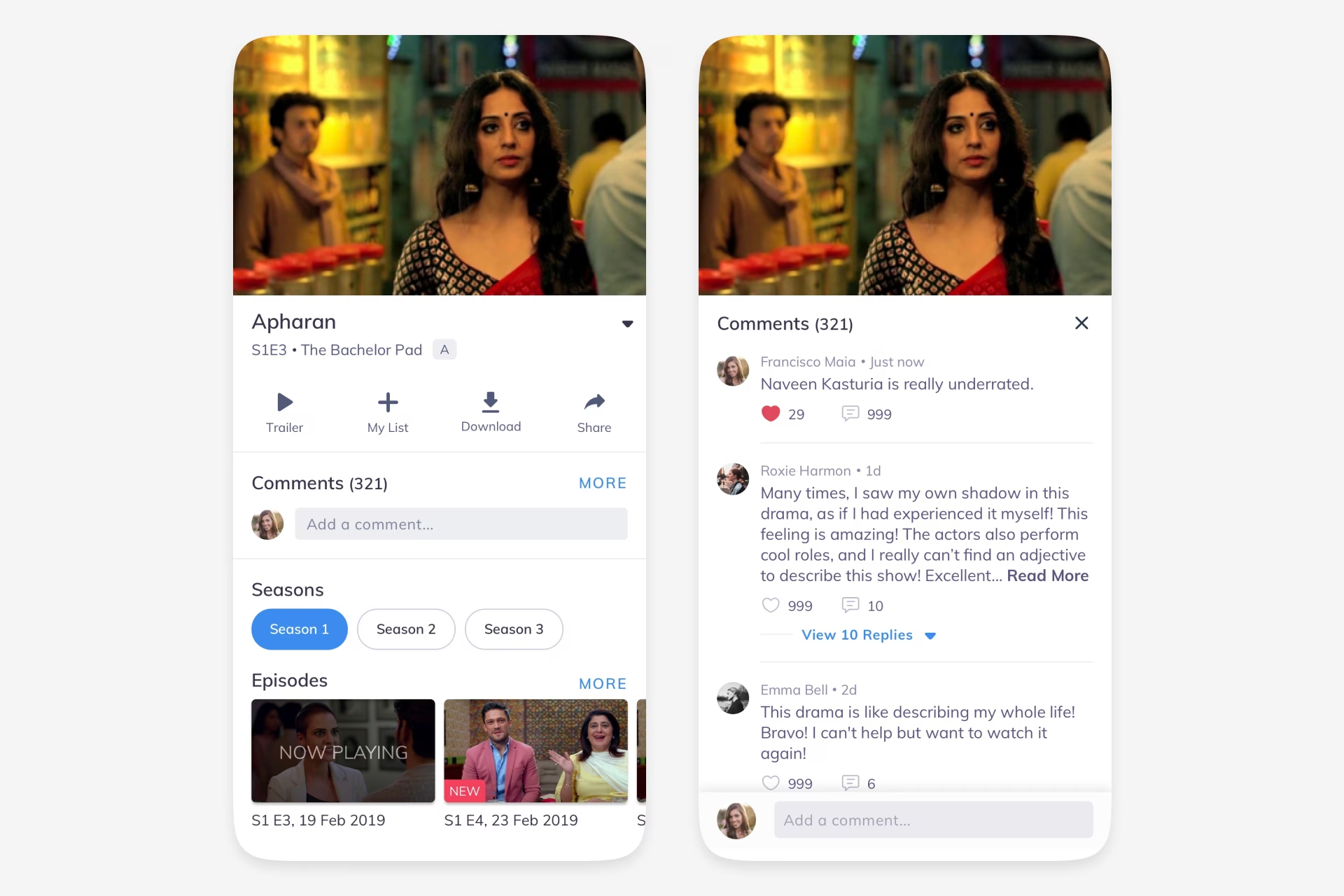
On the collapsed watch page, comments appeared as a compact section below the primary video actions. A visible comment count gave users a sense of activity, a short preview showed the most recent contribution, and a More action opened the complete discussion. For movie pages, the pattern adapted to the existing recommendation and related-clips layout instead of forcing the show-page structure onto a different content type.
The expanded comments view used the video frame as context at the top, then shifted attention to the discussion. Comments were separated with enough spacing for quick scanning, while counts for likes and replies gave users lightweight signals about which conversations were active.
Threading was central to the experience. Instead of treating every comment as a flat reaction, replies were grouped under the parent comment, with controls to view more replies or hide them again. This kept long discussions readable and prevented reply chains from overwhelming the entire page.
Composition and Replies
Comment composition was designed as a low-friction inline action. The input sat at the bottom of the comments surface, close to the user’s thumb and away from the video content. When the keyboard opened, the background dimmed and the composer became the active task, with a clear Send action.
Replying reused the same composer pattern but changed the placeholder to show context, such as replying to a specific user. This reduced the amount of UI needed while still making it clear whether the user was starting a new comment or joining an existing thread.
The design also covered avatar behaviour. Users with profile images displayed their avatar in the input row and comment list, while users without one received a neutral fallback so the layout stayed stable and recognisable even when profile data was incomplete.
States and Safety
The feature needed to feel reliable even when there was no content or when the network was slow. The state coverage included skeleton loading for comment fetches, a retry action for failed loads, and an empty page that invited the first comment without making the screen feel broken.
Deletion used a confirmation dialogue before removing a comment. That extra step mattered because comments were social actions with visible context; accidental deletion would be frustrating, especially inside longer threads.
Deleted comments were handled as a visible state in notifications and comment history rather than disappearing without explanation. This kept the system understandable when a user opened a notification for a comment that was no longer available.
Notification Loop
Comments did not end at the watch page. A dedicated comments tab inside notifications brought users back when someone liked their comment, replied to them, or interacted with a discussion they had joined.
Each notification carried enough context to be useful at a glance: the content title, episode reference, thumbnail, actor or commenter name, and the relevant comment snippet. This made the notification centre a re-engagement surface rather than a generic activity log.
The end result was a complete engagement system around content: users could discover conversations, participate, follow replies, recover from loading problems, understand deleted states, and return through notifications. In product terms, that moved comments from being a simple input box to a watch-page engagement loop.
Ideas by me. Written by AI.
I’m explicit about how I write. The ideas, point of view, and responsibility are mine. AI helps with structure, clarity, and speed.
Why I work this way →Add a comment
Your comment will be sent to me privately before being published.
Like what you see?
Let’s team up
Together, let’s redefine your business’ product experience strategy.
You can contact me at: