Customising Local Video Player
With each release, we try to juice up our Local Video Player experience. For this update, we let users choose which actions appear as quick shortcuts on the player while keeping the rest available under More.
Results
- Gave power users faster access to their preferred actions without crowding the player UI.
- Kept advanced controls discoverable through the More panel, including a swipe path for additional options.
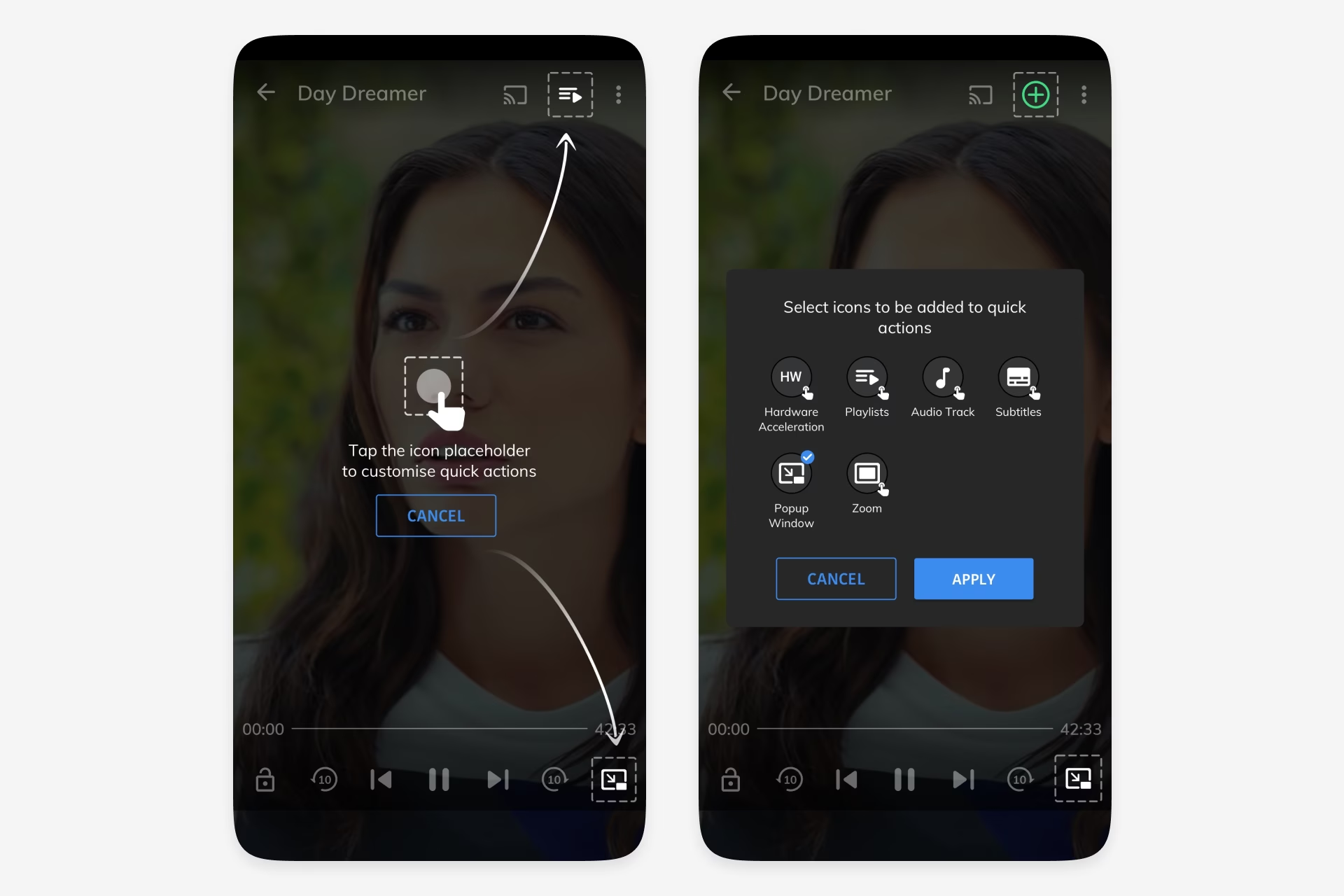
- Used a short education overlay and edit mode to make shortcut customisation easy to understand.
Date
Team member
Cui Shanshan
Organisation

Problem
MX Player’s local video player served users with different habits, priorities, and viewing contexts. A fixed row of actions could not satisfy everyone equally, especially users who relied on controls like audio track, subtitles, playlist, popup window, or hardware acceleration more often than others.
The design task was to make the player more personal without turning the watching screen into a dense control panel.
Quick Shortcuts and More
The player exposed a small set of quick shortcuts directly over the video, with the remaining actions grouped under More. That let the primary screen stay clean while still giving users access to network stream, display settings, share, information, audio track, subtitles, playlist, and other tools.
The More surface also supported swipeable pages, so additional controls could be added without overloading a single panel.
Edit Mode
Edit mode introduced clear placeholder slots on the player and explained that tapping an icon placeholder would customise quick actions. This made the new behaviour visible in context, directly where the user would use it.
From there, users could select icons to add to quick actions and apply the changes, turning customisation into a short, contained flow rather than a settings hunt.
Easier Access to Favourite Actions
The value was simple: the controls could better match how each person actually watched videos. Frequently used actions moved closer to the video, while less common actions stayed available without competing for space.
Outcome
The update increased satisfaction and engagement by giving users more ownership over the local video player experience.
By making customisation available inside the player, MX Player could serve both power users and new users who wanted a video experience that catered to their individual needs.
Ideas by me. Written by AI.
I’m explicit about how I write. The ideas, point of view, and responsibility are mine. AI helps with structure, clarity, and speed.
Why I work this way →Add a comment
Your comment will be sent to me privately before being published.
Like what you see?
Let’s team up
Together, let’s redefine your business’ product experience strategy.
You can contact me at: