YM.dat: A Tiny Tool for Old Yahoo! Messenger Archives
I had been trying to read these old .dat files for years. This time, instead of looking for the right tool again, I built one.

I have had my old Yahoo! Messenger chat archive files with me for years. Every once in a while, I would remember them, try to open them, fail, search for a reader, and then give up again.
I knew they were not going to open like normal text files. They were .dat files, not exports or transcripts. They were the original local files Yahoo! Messenger wrote to disk, which meant the chat was in there somewhere, just not in any readable form.
Over the past decade, I searched for a tool that could open these Yahoo! Messenger archives properly. I never found anything that worked well for me. The few tools I did come across were usually old, Windows-only, or too awkward to trust with personal chat logs.
So this time I stopped looking and decided to build one.
I did not want to upload my entire archive anywhere, so I started with one file and asked Claude to try deciphering it.
The First Message
I started with one file named 20050101-iii_yank_iii.dat. The date was clearly in the filename, but that was the easy part. The actual messages were still buried inside the binary file.
After some back and forth, Claude managed to pull out the first message:
“Happy New Year!”
That was enough. Once that line appeared, I knew the file was not lost. The rest of the conversation started appearing after it, complete with timestamps and the original text from that very specific 2005 internet.
The Filename Was Mine
There was one important correction I had to make early on. Claude initially treated iii_yank_iii as the person I was chatting with. That made sense from the filename, but it was wrong.
iii_yank_iii was my Yahoo! ID. The person I was chatting with came from the folder the file lived inside. In this case, that was psychotron1586.
That small detail shaped the tool. My ID could be detected from the filename, but the contact ID had to be entered manually because a browser cannot reliably read the parent folder name when you select individual files.
The Weird Little XOR Bit
The reason the file looked unreadable was XOR. I had to ask what that even meant, because I did not want to blindly trust a tool that was supposedly “decrypting” my old chats.
The short version: Yahoo! Messenger lightly scrambled each message using my Yahoo! ID as a repeating key. Not secure encryption in any serious sense, but enough to stop the file from being readable if you just opened it normally.
Use the same ID again, and the message comes back. Simple, strange, and very much of that era.
Turning It Into A Tool
Once one file worked, I did not want a one-off answer sitting inside a chat window. I wanted something I could keep, open locally, and use whenever I wanted to process more files.
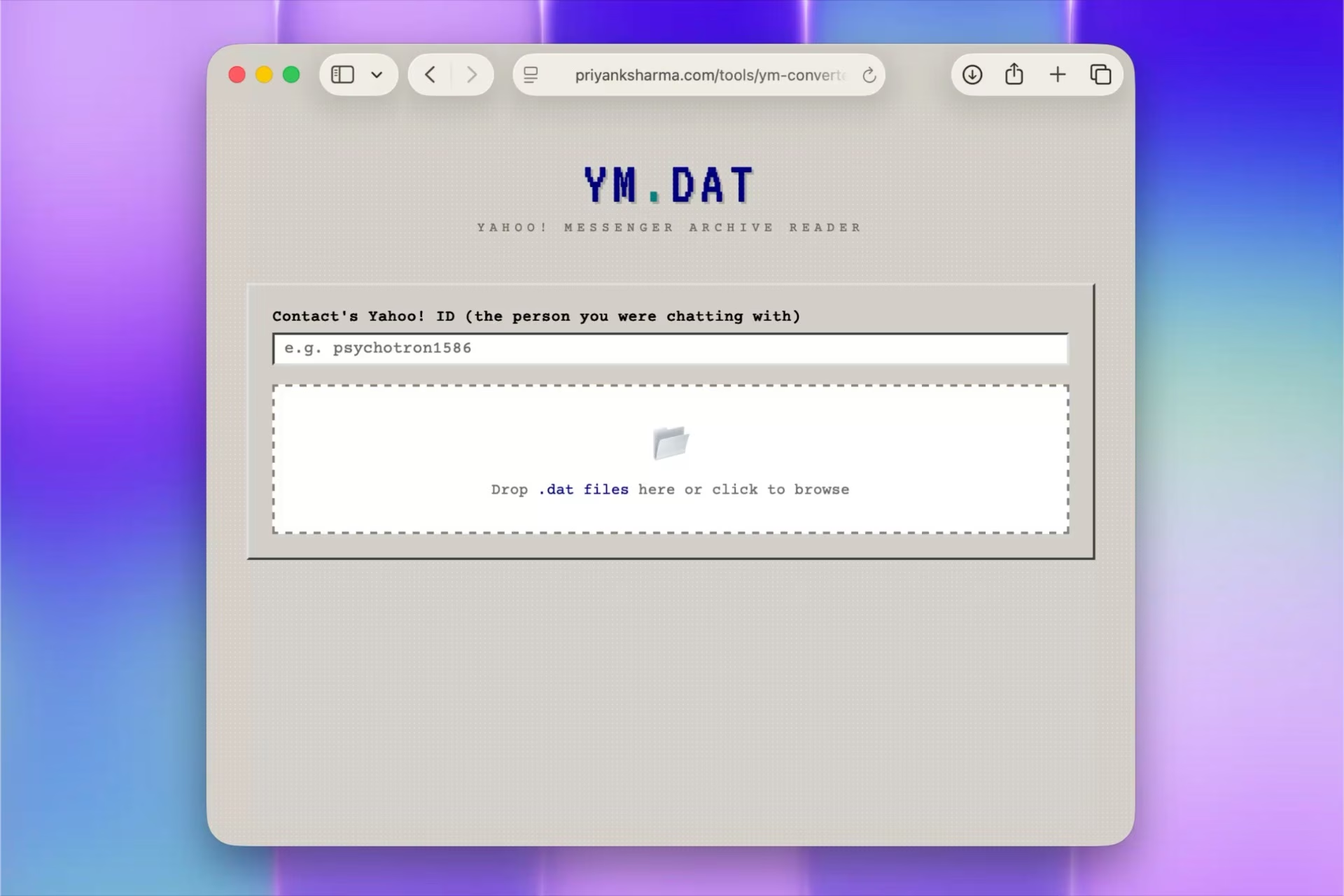
The rule was: one HTML file. It should open in a browser, ask for the contact’s Yahoo! ID, let me drop in .dat files, and show the chats. No server, no install, no account, and definitely no uploading private messages to some random service.
The first version worked, but it still needed shaping. My ID had to be detected from the filename. The contact name had to be entered manually. The output had to be clean enough to save. And because this was Yahoo! Messenger, the page needed to feel a little like old software without becoming unreadable.
- Detects my Yahoo! ID from filenames like 20050101-iii_yank_iii.dat
- Lets me enter the contact’s Yahoo! ID manually
- Decodes and displays the conversation in a light Windows 98-style interface
- Exports a clean plain text transcript with date, participants, and messages
I also went down a side path of trying to set the exported text file’s creation and modification dates to match the chat. That sounded nice in theory. In practice, browsers cannot set downloaded file timestamps, and the alternatives involved scripts or a native app. That was exactly the kind of friction I did not want.
Keeping The Old Typing Intact
One version replaced old Yahoo! emoticons with modern emoji. Technically, it worked.
But it felt wrong immediately.
These chats are not just the words. They are the way people typed then. The :D, =)), and \m/ >:) \m/ are part of the memory. Replacing them with polished modern emoji made the archive feel less true. So I removed that and kept the original characters.
The exported transcript uses a simple header:
Yahoo! Messenger conversation
Date: 01-01-2005
Between: iii_yank_iii and psychotron1586
────────────────────────────────────────
Releasing It
I cleaned up the page, added the usual metadata and page structure, and put the tool online. It still runs entirely in the browser. The files stay on your device.
If you also have old Yahoo! Messenger .dat files lying around, you can try it here:
It is a tiny tool for a very specific problem, but I like that. Somewhere inside these files are old usernames, bad spellings, late-night jokes, random game references, and tiny pieces of a web that no longer exists.
Getting even a few of those messages back makes the whole thing worth it.
Ideas by me. Written by AI.
I’m explicit about how I write. The ideas, point of view, and responsibility are mine. AI helps with structure, clarity, and speed.
Why I work this way →Discussion
“That Pinging initially used to irritate me...i actually walked upto the person and told him you could just ask me that rather than ping me 🙃😅”

Deepak Bhutani
Growth Hacker, The Juke Box – Plug & Play
“Though I suspect you eventually gave in, just like everyone else. 😄”

Priyank Sharma
Author
“when in Rome be Roman 😊”
Deepak Bhutani
Growth Hacker, The Juke Box – Plug & Play
“Audibles were way ahead of its time!”

Rajarshi Kalraiya
Assistant Vice President – Sales, Reloy
“Ohh yeah, absolutely. Had worked on so many of them.”
Priyank Sharma
Author
“This is such a specific and nostalgic tool! Did you build this to recover old personal data, or was there a technical curiosity about the .dat file structure?”

Rivra
19+ Years SF-Bay area Big Tech Veteran
“Primarily to recover personal data. I had loads of chat archives lying around since late 2000s and I was never able to find a tool that reliably does this. :)”
Priyank Sharma
Author
Add a comment
Your comment will be sent to me privately before being published.